Developer OneNote

Emma's OneNote for Microsoft Windows, Office and Programming

Tag: Office

OneNote 2010 New Features

15 June, 2010 | Category: Office

Office 2010 has a few great new features and improvements which make sharing and collaboration easier than ever.

OneNote Web Application

You can now create OneNote notebooks through web browsers and have other people to view, edit and collaborate anywhere. All notebooks created online will be saved to SkyDrive so you will need to have a Windows Live ID.

OneNote Web Application is free, just like other similar live service Microsoft has delivered over many years (hotmail, messenger). To get start with OneNote Web App, go to http://office.live.com and logon with your Windows Live ID. OneNote Web Application has familiar OneNote interface so you don’t have to learn it.

Read more »

Sync OneNote 2010 notebooks to SkyDrive

10 June, 2010 | Category: Office

In order to sync OneNote 2010 notebooks to SkyDrive and use OneNote Web Application, you will need have Internet Explorer 7 or later version installed.

  • Windows XP with IE8
  • Windows Vista with IE7 or IE8
  • Windows 7 with IE8

Also notebooks files from OneNote 2007 needs to be upgraded to OneNote 2010 file format as only 2010 format is supported by SkyDrive. You can convert old notebooks to 2010 format by

  1. File –> Info –> Setting –> Properties
  2. Click ‘Convert to 2010’ button and press okay.

SkyDrive is Live with OneNote Sync

8 June, 2010 | Category: Office

SkyDrive is live with OneNote Sync, you can now go to Office.live.com and start upload your OneNote files. Office Web Apps on SkyDrive are available free for personal use.

When you creating New Notebook in OneNote 2010, you can now save it to SkyDrive directly, the web option which was always "not available" is now available. To get start, you will need to have a Windows Live ID, and sign in when you are asked to. Notebooks will be automatically synced among different OneNote clients if they are online.

Sync OneNote to SkyDrive

You can also create other types of office documents on Office.live.com directly, including Word, Excel and PowerPointCreate Office Web Application

Troubleshot Tips

We are sorry. This service is currently not available

This is because you are using a pre-release version (either BETA or RC). OneNote Sync with SkyDrive only works with OneNote 2010 RTM edition. Upgrade to OneNote 2010 and you should no longer see this message.

Unable to connect to Windows Live SkyDrive

Open IE, go to IE Internet Options, clear browse history, passwords, cookies. And then retry.

Exceed Office 2010 Trial Period

15 May, 2010 | Category: Office

Office 2010 can be run for 30 days for free before needing to be active, or you will start seeing activation notification dialog. If you want to exceed the 30 days free trial during evaluation, you will need to rearm your Office 2010.

To rearm Office 2010, type in the following from an elevated command prompt:

“C:\Program Files\Common Files\Microsoft shared\OfficeSoftwareProtectionPlatform\OSPPREARM.EXE”

Read more »

Office 2010 Upgrade, 32 or 64 bit?

14 May, 2010 | Category: Office

Office 2010 is the first release of Office that contains 64 bit edition. It’s recommended to install the 32 bit version Office 2010 due to compatibility issues however if you still want to try 64 bit version keep these in mind.

  • 32 bit version works on both 32 bit and 64 bit windows operation systems. But 64 bit version Office 2010 must be installed on 64 bit windows operation systems.
  • You can’t upgrade from 32 bit Office 2007 to 64 bit Office 2010 directly, you have to uninstall existing 32 bit Office products prior to install 64 bit Office 2010. (It’s okay to upgrade Office 2007 to 32 bit Office 2010 on either 32 bit or 64 bit operation systems)
  • You can’t run 64bit and 32bit office products side by side. For example, you can’t have side by side installation of 32 bit OneNote 2010 and 64 bit Outlook 2010
  • Some of 32bit Office Add-Ins might not work on 64 bit Office 2010.

Error 1731 During Office 2010 Installation

11 May, 2010 | Category: Office

When you upgrade Office 2010 from BETA to RTM, you might get Error 1731 the source installation package for the product Microsoft Office Office 64-bit Components 2010 is out of sync with the client package as shown in this screenshot.

image

Read more »

Office 2010 reaches RTM

18 April, 2010 | Category: Office

After Visual Studio 2010 released publicly 12th this month, Microsoft office team announces Office 2010 reaches RTM today. Office 2010 RTM is not available on TechNet yet, MSDN subscribers will have to wait till the officially Office 2010 launch at May 12.

I am happy to see that all bugs I hit in Outlook BETA are all fixed in RTM.

OneNote: Unread Highlighting cannot be cleared

Some shortcuts no longer work in Outlook 2010

Large email sizes in Outlook 2010 BETA

Update

22th April – Office Professional Plus 2010 is available to download for MSDN and TechNet subscribers. This is the first release of Office that contains 64 bit edition. The RTM build number is 14.0.4673.1000

It’s recommended to install the 32 bit version Office 2010 due to compatibility issues however if you still want to try 64 bit version keep these in mind.

Read more »

OneNote System Tray Icon Reappears

16 April, 2010 | Category: Tips and Tricks

System tray icon reappears every time OneNote is started, how to turn it off?

Turn off OneNote System Tray Icon

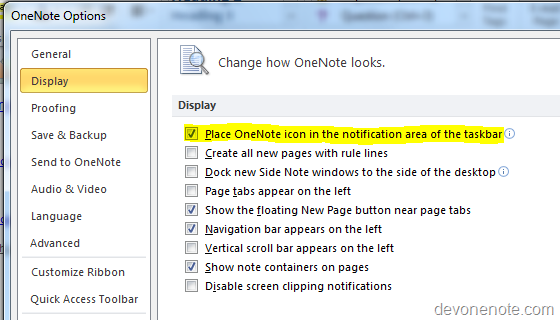
Go to File, click options, and then click display tab, uncheck Place OneNote Icon in the Notification Area of the Taskbar.

OneNote System Tray

Note: Turn of OneNote icon in taskbar also turn off  OneNote Snap Tool, if you wish to use Windows key + S to bring up OneNote Snap Tool to capture screenshot, you will need to have option Place OneNote Icon in the Notification Area of the Taskbar marked.

Update 5-22 The equivalent in OneNote 2007 is Go to Tools, and click Other and then uncheck Place OneNote Icon in the Notification Area of the Taskbar

Turn on OneNote System Tray Icon

Change Place OneNote Icon in the Notification Area of the Taskbar option back to marked will get OneNote System Tray Icon back.

OneNote Is Unable To Start

16 April, 2010 | Category: Office

You might see OneNote failed to start with following error message displayed

OneNote is unable to start. This may be caused by insufficient hard drive space or by insufficient write permissions for OneNote’s notebook cache files in you user setting folder. Try to delete any unnecessary files from your computer and then try starting OneNote again. If this message persists, contact your system administrator. Error code: 0x45D

Read more »

Will the screen saver disrupt my presentation

16 April, 2010 | Category: Office, Windows

If you give presentation to customers you might have the question like will the screen saver disrupt my presentation by locking my laptop screen.

The answer is NO, if the PowerPoint presentation file is opened in full screen Side Show mode, screen save will never get trigged. However, it must be Side Show mode. If you have presentation opened in edit mode, and the laptop is idle longer than screen save timeout threshold, screen save will still get triggered and lock the screen.