Month: March 2010

  • OneNote Snipping Tool

    I previously used Alt+PrintScreen key for screenshots and then pasted into MSPaint and then edited the picture, and then capture just part of a screenshot. Now a better way is install Microsoft OneNote and take screenshot via the WinKey + S and then select the portion of the screenshot you want and paste anywhere.

    Note: this option also available under menu “Insert”  -> “Screen Clipping”

    And yes, it’s better than Vista/Win7’s snipping tool in my option.

  • Find Dead Code

    Dead code means block of code that is not reachable in application. They can cause noisy in code debugging and confuse developers. Sometimes I might spend a few hours to figure out why a breakpoint never hit.

    Most of code defect is result of old function no longer used and referenced. Remove them will prevent developers from wasting time investigating wrong code. Thanks to FxCop in visual studio, now finding dead code is pretty straight forward. (more…)

  • Span Remote Desktop Across Multiple Monitors

    To span remote desktop across multiple monitors, launch an RDP connection using mstsc /span from the command prompt on your machine. This works on Vista/Windows 7. If you have a Win2K3 machine then you need have Terminal Services Client 6.0 installed. You can download it here.

    Update

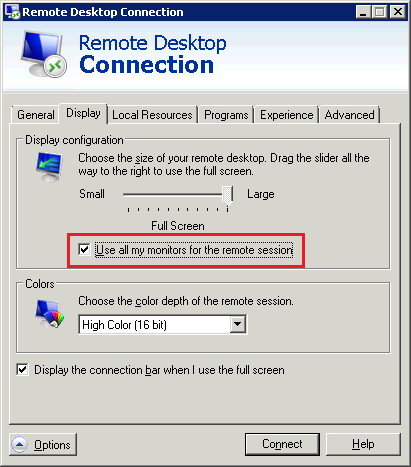
    If you use Remote Desktop Client 7.0 connect to Window 7 or Windows server 2008 R2 remote machine, you can simply check "Use all my monitors for the remote session" to do this.

    image

  • Burning ISO files to CD/DVD media

    To burn .iso files on CD disks use cdburn utility

    Usage:

    <DVDDriveLetter>: ISOFileName

    Example:

    cdburn e: d:osWin7_amd64.iso to burn the image on CD disk, where e: is CDROM

    (more…)

  • File is Missing or Invalid Error Message

    I frequently hit this on my Win7/Vista machines when I run executables that were built from VB6, the following error message appears:

    Component ‘filename’ or one o its dependencies not correctly registered: a file is missing or invalid.

    The problem is caused by a component or a dependency file used in this executable is not correctly registered or is missing from the system. The solution is copy the file from another computer that does not experience this problem and register it.

    I wrote step by step instructions on how to resolve this problem in this post. It uses comdlg32.ocx as example but instructions also apply for other VB6 component file like richtx32.ocx, mscomctl.ocx, tabctl32.ocx and so on

  • List of dev and test tools for IE8

    From http://www.microsoft.com/windows/internet-explorer/readiness/testing-tools.aspx

    Here is a list of convenient development and test tools to help test and modify applications to run on Internet Explorer 8:

    Debugging websites

    Debugging User Agent String Changes
    This program produces a report on Internet Explorer’s current User Agent String, along with scripts to simulate User-Agent Strings for other Internet Explorer versions and links to MSDN User-Agent String articles.

    Internet Explorer Developer Tools
    Internet Explorer 8 includes tools needed by web developers to efficiently debug and profile their sites directly in the browser.

    Fiddler
    This is an HTTP Debugging Proxy that logs all HTTP traffic between a computer and the Internet.

    Process Monitor
    Process Monitor is an advanced monitoring tool for Windows that shows real-time file system, registry and process/thread activity.

    Process Explorer
    This program displays information about which handles and DLL processes have opened or loaded (Vista and Windows XP SP2).

    W3C Validator HTML/XHTML
    This is a W3C service to check the syntax of HTML and XHTML.

    W3C Validator CSS
    This is a World Wide Web Consortium (W3C) service to check the syntax of CSS.

    RSS Feeds Validator
    This is a W3C service to check the syntax of RSS feeds.

    Windows Internet Explorer Testing Center
    Test pages that we developed in conjunction with World Wide Web Consortium working groups.

    IE Compat Test Tool
    The Internet Explorer Compatibility Test Tool (IECTT), part of the Application Compatibility Toolkit (ACT), helps identify application and website compatibility issues on Internet Explorer 8 and Internet Explorer 7. The IECTT identifies your web-based issues, uploads the data to the ACT Log Processing Service, and shows your results in real time. These tools help customers lower their costs for application compatibility testing, prioritize their applications, and deploy Internet Explorer more quickly.

    SuperPreview
    Expression Web SuperPreview for Internet Explorer is a visual debugging tool that makes it easier to migrate your websites from Internet Explorer 6 to Internet Explorer 7 or 8.

    Designing/Creating websites

    Expression Web
    Microsoft Expression Web is a professional design tool to create modern, standards-based sites that deliver superior quality on the web.

    Visual Web Developer Express
    Visual Web Developer 2008 Express Edition is a free, easy to use, and easy to learn program that allows everyone—from the novice to the professional developer—to create ASP.NET websites.
  • Delete blank lines from text file

    This note is for a few quick ways to delete all blank lines from a text file.

    1. sed ‘/^$/d’ file > file_new
    2. grep -v "^$" file > file_new
    3. (This is for Notepad++ users) Select all text (shortcut Ctrl+A) and then click Menu TextFX -> TextFX Edit -> Delete Blank Lines

    delete blank lines in notepad++

  • Onenote 2010 Highlight Unread Changes

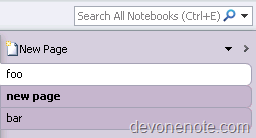
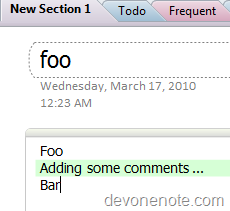
    OneNote 2010 has a new feature, it remembers notes you’ve read and highlights new changes since you last read. All new unread content on pages will be highlighted with green highlight. This is very helpful for people who use OneNote for team collaboration. Everyone can easily see what exactly others has added and/or contributed. The pages contain unread content will have bold text in tab and all unread content will be highlighted in green.

    New page with bold text tab

    New page with bold text tab

    New content with green highlight.

    image

  • Visual Studio plug-in: GhostDoc

    Are your tired of documenting you code using C# /// XmlDoc syntax for each and every method?

    It is time for you to meet SubMain’s GhostDoc. SubMain’s GhostDoc is a Visual Studio plug-in the was design just for you. It will parse your method/property/parameters names and will create a great documentation just for you with simple Ctrl+Shift+D.

    Download it Free at: http://submain.com/products/ghostdoc.aspx. (more…)

  • Forget WordPress Admin Password

    After setup local WordPress environment, WordPress will generate a password for admin logon. The password is so strong that forget the password can easily happen. The easiest way to get admin password back is reset it again in database.

    Here is the SQL command that will do it:

    UPDATE ‘wp_users’ SET ‘user_pass’ = MD5(‘PASSWORD‘) WHERE ‘user_login’ =’admin’ LIMIT 1;

    Note you need update red PASSWORD to the real password you want reset.

    After the command succeeds, you will be able to login to WordPress with new password.